How to know if coding is right for you before joining a bootcamp
Not sure if coding is for you? Learn the signs you'd enjoy programming, try a free 30-minute coding challenge and find out what to do before joining a bootcamp.
On this page
- Key takeaways
- How do you know if coding is right for you?
- 5 signs you might enjoy learning to code
- 1. You're curious about how technology works
- 2. You enjoy solving problems
- 3. You're willing to learn from mistakes
- 4. You enjoy building things
- 5. You're open to continuous learning
- A beginner's coding self-assessment checklist
- What do your answers tell you?
- Try this 30-minute coding challenge
- First 10 minutes: create your webpage using HTML
- Next 10 minutes: style your webpage using CSS
- Final 10 minutes: add interactivity using JavaScript
- What did you think of the experience?
- What if coding feels difficult at first?
- Do you need to be good at maths to learn coding?
- Is it still worth learning to code now that AI can write code?
- What if you enjoy technology but don't enjoy coding?
- Should you teach yourself coding or join a bootcamp?
- Getting started with coding at Zaio
- So, is coding right for you?
- Frequently asked questions
Key takeaways
- Coding may be right for you if you enjoy solving problems, building things and understanding how technology works.
- You don't need previous experience or advanced maths to begin learning web development.
- Finding coding difficult doesn't mean it isn't for you. Learning programming involves making mistakes and figuring out how to fix them.
- AI hasn't made learning to code pointless. You still need to understand code to guide, check and fix what AI tools produce.
- Try coding before paying for a course. A simple 30-minute challenge can help you discover whether you enjoy the process.
- A coding bootcamp can provide structure and support once you've decided you want to develop your skills further.
If you've been thinking about learning to code, you might be wondering whether it's something you'd actually enjoy.
Maybe you've seen people building websites, creating applications with AI or talking about careers in software development. It sounds interesting, but how do you know whether coding is something you'd want to spend months learning?
Before joining a coding bootcamp, we recommend trying programming for yourself.
You don't need a computer science degree, previous experience or expensive software to get started. A small beginner project can teach you what coding involves and help you decide whether it's something you'd like to pursue.
Here's how to find out.
How do you know if coding is right for you?
Coding may be a good fit if you enjoy solving problems, creating things and working through challenges, even when the solution isn't immediately obvious.
Software development involves more than writing code. Developers need to understand problems, break them into smaller steps and figure out how different parts of an application should work together.
Imagine you're building a website that allows customers to book appointments.
You'd need to decide what information customers should enter, how available times are displayed and what happens after someone makes a booking.
Writing the code is one part of the process. Understanding how the application should work is another.
If you enjoy that kind of thinking, coding could be worth exploring.
5 signs you might enjoy learning to code
There's no particular personality type that makes someone a good developer. People enter software development from different backgrounds and develop their skills in different ways.
However, a few characteristics can make the learning process more enjoyable.
1. You're curious about how technology works
Have you ever used an app and wondered how it was built?
Maybe you've thought about how an online store processes orders or how a website remembers your preferences.
That curiosity can be useful when learning programming. As you progress, you'll understand how interfaces, databases and backend systems work together.
2. You enjoy solving problems
Developers regularly break larger problems into smaller tasks.
For example, when building a calculator, you'd need to work out how users enter numbers, select operations and see the result.
If you enjoy working through problems and testing different solutions, you may like the logical side of coding.
3. You're willing to learn from mistakes
Your code won't always work the first time.
You might miss a bracket, use the wrong variable or write a function that produces an unexpected result.
Developers spend time debugging their applications, reviewing errors and figuring out what went wrong.
You don't have to enjoy every frustrating moment. Being willing to investigate and try again is what matters.
4. You enjoy building things
One of the rewarding parts of coding is seeing something you've created actually work.
You might start with a personal webpage, then progress to a budgeting tool, booking system or interactive application.
If you enjoy turning ideas into something useful, software development gives you opportunities to do that.
5. You're open to continuous learning
Programming languages, frameworks and development tools change over time.
Even experienced developers regularly read documentation, research solutions and learn new technologies.
You don't need to know everything, but being comfortable with learning new things will help as your skills develop.
A beginner's coding self-assessment checklist
Before deciding whether to join a coding bootcamp, think about the following questions.
This isn't an aptitude test or something you need to pass. It's simply a way to reflect on your interests and learning preferences.
What do your answers tell you?
If most of these questions sound like you, coding could be worth exploring. But don't make your decision based on the checklist alone.
You might enjoy programming even if you don't consider yourself particularly patient or logical right now. These are skills you can develop through practice.
If you're unsure about your answers, that's also fine. You may need to experience coding before you can decide whether it's something you enjoy.
The next step is to try it.
Try this 30-minute coding challenge
One of the easiest ways to explore programming is to build a simple webpage.
For this challenge, you'll create a webpage with a heading, a short description and a button that changes the text when clicked.
You don't need to install complicated software or pay for a course.
Open CodePen and start a new Pen. In the Files panel on the left, you'll see three files: index.html, style.css and script.js. Click a file to open it in the editor. The preview on the right shows your webpage.
Seeing three side-by-side panels labelled HTML, CSS and JS instead? You're in CodePen's older layout. Just paste each snippet below into the matching panel.
Follow the steps below.
First 10 minutes: create your webpage using HTML
HTML is used to structure the content of a webpage.
Click index.html. CodePen has already added the basic structure of a webpage for you.
Find the empty line between <body> and the <script> line, and paste the following there:
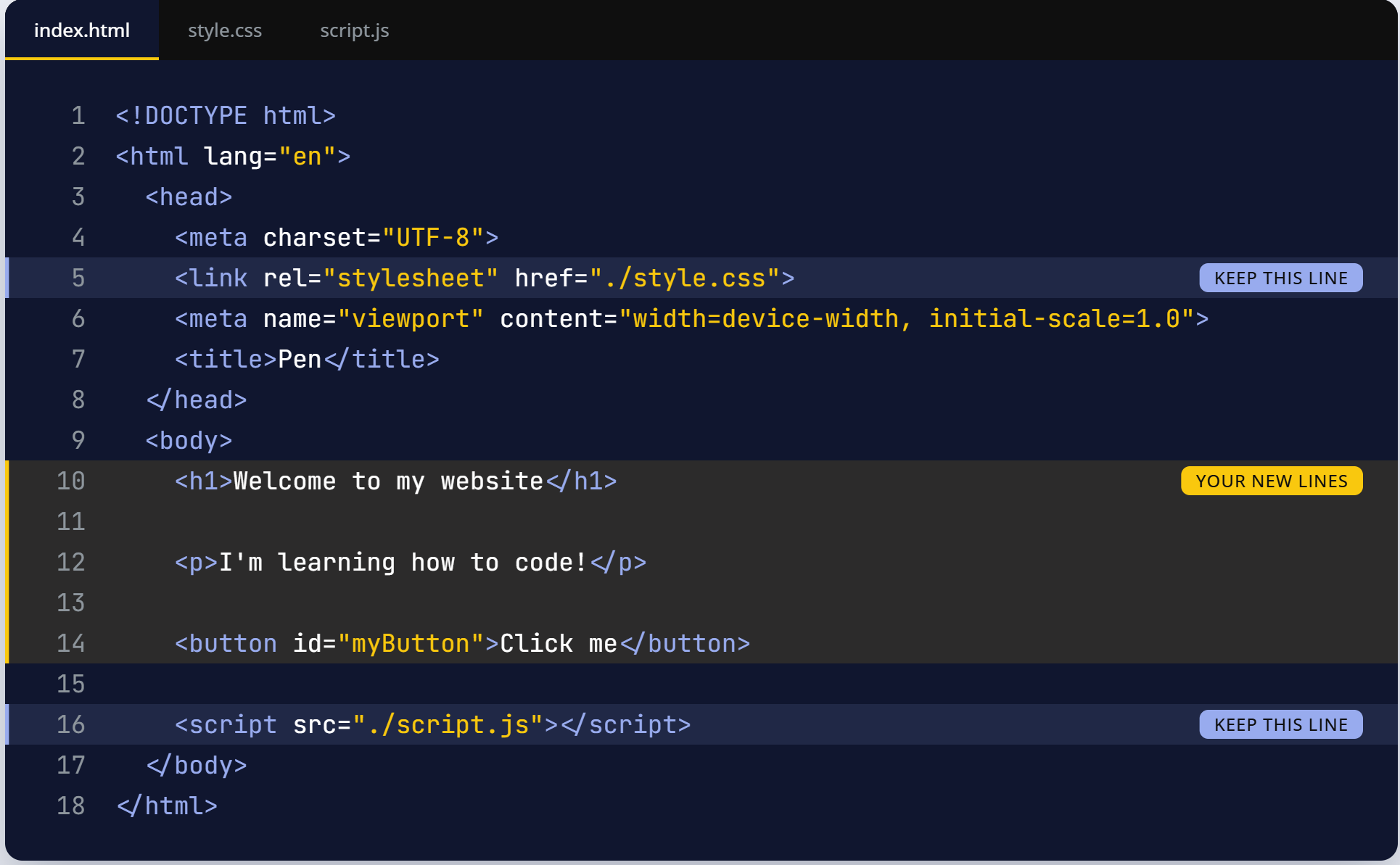
Don't delete the other lines. The <link> line connects your page to style.css, and the <script> line connects it to script.js. The next two steps won't work without them.
You should now see a heading, paragraph and button in the preview. If the preview doesn't update, click the refresh button above it.
Try changing the heading or paragraph to something about yourself.
Next 10 minutes: style your webpage using CSS
CSS controls how a webpage looks.
Click style.css in the Files panel and enter:
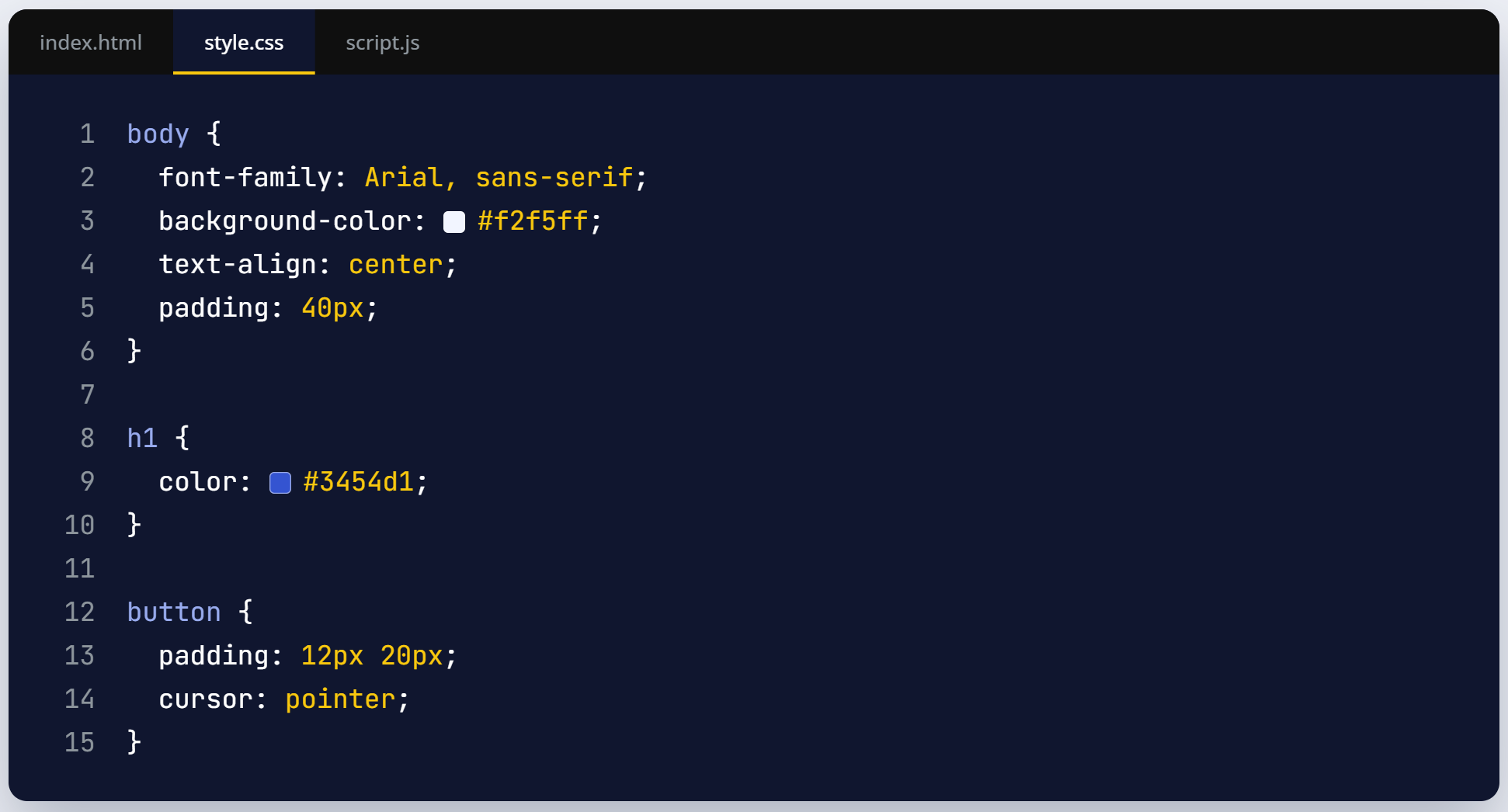
Your webpage should now have a light background, a blue heading and a button with more spacing.
Experiment with the colours or font sizes to see how changing the code affects the design.
Final 10 minutes: add interactivity using JavaScript
JavaScript allows you to add behaviour to websites.
Click script.js in the Files panel and enter:
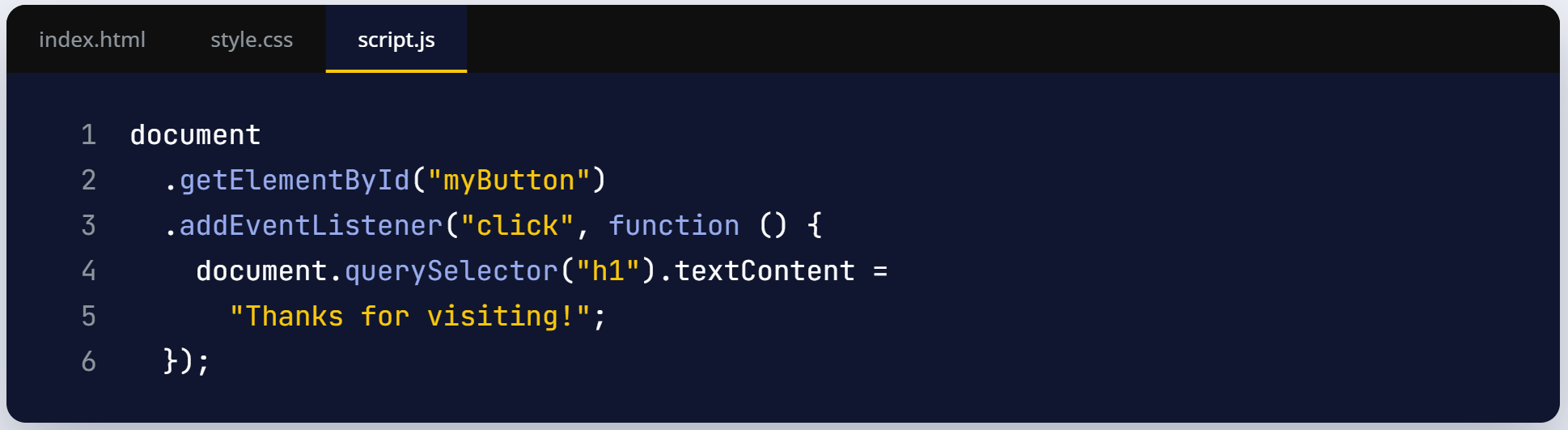
Now click the button in your preview.
The heading should change from Welcome to my website to Thanks for visiting!
You've just created a basic interactive webpage using HTML, CSS and JavaScript.
If the code doesn't work immediately, check that you've copied everything correctly, including the quotation marks and brackets, and that the <link> and <script> lines are still in index.html.
You can also use freeCodeCamp's beginner lessons to understand what each part of the code does.
The 30 minutes are a suggested introduction, not a deadline. If you need longer to complete the project, that's completely fine.
Got it working? HTML, CSS and JavaScript are where Zaio's Full Stack Web Development bootcamp starts, before learners move on to React, Node.js and databases. See what you could build next.
What did you think of the experience?
Once you've tried the challenge, consider how you felt while building the webpage.
Did you enjoy seeing your changes appear on the screen? Were you curious about what else you could build? When something didn't work, did you want to understand why?
You might discover that you enjoy styling the webpage but aren't as interested in JavaScript. Or perhaps making the button work was your favourite part.
These observations can help you understand which areas of technology interest you.
The purpose of the challenge isn't to measure how quickly you learn. It's to find out whether you enjoy the process enough to continue.
What if coding feels difficult at first?
It's normal to find programming confusing when you're starting.
Variables, functions and programming logic may feel unfamiliar, especially if you've never worked with code before.
You might spend 20 minutes trying to understand why something isn't working, only to discover a small spelling mistake.
That can be frustrating, but finding and fixing the problem is part of learning.
There's also a difference between finding coding difficult and genuinely disliking it.
If you struggle with a concept but still want to understand how it works, that's a reason to keep practising.
Try breaking problems into smaller steps, revisiting the fundamentals or asking someone to explain the concept differently.
One difficult exercise doesn't determine whether you can become a developer.
Do you need to be good at maths to learn coding?
You don't need advanced maths to begin learning web development.
Most beginner web development projects focus on HTML, CSS, JavaScript and programming logic.
Basic arithmetic can be useful, but you don't need advanced calculus to build a personal website or a simple interactive application.
Some specialised fields, including machine learning, computer graphics and certain areas of data science, require stronger mathematical knowledge.
If you're interested in becoming a web developer, start with the fundamentals before worrying about advanced mathematics.
Is it still worth learning to code now that AI can write code?
Yes. AI tools can write code quickly, but you still need to understand code to use them well.
AI coding assistants can generate a webpage, suggest a function or explain an error message. That makes them useful for learning and for working faster.
But they don't know exactly what your application needs, and the code they produce isn't always correct. Someone still has to describe the problem clearly, check whether the result works, spot mistakes and fix them when something breaks.
That's where coding knowledge comes in. If you understand HTML, CSS and JavaScript, you can read what an AI tool has written, judge whether it's right and change it when it isn't. Without that understanding, you're copying code you can't check.
The habits from the five signs above, such as breaking problems into steps, debugging and continuous learning, matter just as much when you're working with AI.
A practical approach for beginners is to learn the fundamentals yourself, then use AI tools to explain concepts, review your code and help you get unstuck. For example, try asking an AI assistant to explain each line of the JavaScript from the challenge above.
What if you enjoy technology but don't enjoy coding?
Software development isn't the only career path in technology.
You might enjoy solving technical problems, working with digital products or understanding how businesses use technology without wanting to spend most of your time programming.
Other paths worth exploring include UX/UI design, IT support, business analysis, software testing and digital marketing.
These roles have different technical requirements. Some involve little coding, while others may require scripting or programming knowledge.
You might also discover that you don't enjoy a particular type of coding. Building websites is only one way to use technical skills:
- If you like finding patterns in information, data science uses Python and SQL to analyse data and build machine learning models.
- If you'd rather automate repetitive tasks, full stack AI engineering focuses on building applications and workflows powered by AI models.
- If you're interested in how systems are attacked and protected, cybersecurity focuses on keeping systems and data safe.
- If you like keeping systems running, Cloud and DevOps engineering covers how applications are deployed and managed.
These paths still involve technical skills, and most use some programming. Before ruling out programming entirely, consider exploring another beginner-friendly area.
If you're thinking about changing careers, our guide to learning to code after 30 explains how your previous work experience can help you transition into technology.
Should you teach yourself coding or join a bootcamp?
Once you've tried programming and decided you want to learn more, the next question is how to develop your skills.
Self-study can work well if you're comfortable finding resources, following tutorials and managing your own progress.
A coding bootcamp may be more suitable if you prefer structured lessons, practical projects and support when you get stuck.
Neither option removes the need to practise.
Once you know you enjoy the process, structured learning can help you build on that interest.
Getting started with coding at Zaio
If you've tried coding and want to develop your skills further, having a clear learning pathway can make the next steps easier.
At Zaio, our Full Stack Web Development bootcamp is designed for beginners, including learners with no previous programming experience.
The 6-month programme starts with HTML, CSS and JavaScript before progressing into React, Node.js, databases and building full-stack web applications. You'll also learn web development best practices for working with AI tools such as Cursor.
Learning takes place online, so you can join from anywhere in South Africa. The programme includes scheduled live sessions, support from tutors and mentors, and access to a 24/7 AI tutor between sessions.
Throughout the programme, learners build practical projects that help them apply their skills and develop a portfolio of work.
The programme also includes the QCTO Occupational Skills Programme, leading to an NQF Level 4 certificate. That's a nationally recognised qualification, which self-study alone can't give you.
We also offer career preparation support, including CV and portfolio reviews and mock interviews.
You can pay upfront, in installments or monthly through our financing partner, Manati (subject to approval). Current fees and payment options are listed on the programme page.
Completing a bootcamp doesn't guarantee employment, but structured learning and practical experience can help you prepare for opportunities in software development.
You can explore our programmes to compare your options and find a learning pathway that suits your goals.
So, is coding right for you?
You don't need to decide whether software development is your future career before you've tried programming.
Start with something small. Build a webpage, experiment with JavaScript and see how you feel when you get something working.
If you enjoy the process, keep going. Try another project, learn a new concept and gradually challenge yourself.
And if you discover that coding isn't something you enjoy, that's useful information too. There are other ways to pursue a career in technology.
The best way to know if coding is right for you is to try it before committing to a course.
Frequently asked questions
- How do I know if coding is right for me?
Coding may suit you if you enjoy problem-solving, building things and learning through trial and error. Try a simple project to see whether you enjoy the process before committing to a longer course.
- Should I learn to code if I have no experience?
Yes. You can start learning programming without previous technical experience. Beginner resources can help you understand HTML, CSS and JavaScript.
- Do I need to be good at maths to become a developer?
Not necessarily. Beginner web development generally doesn't require advanced maths, although certain specialised technology fields involve more mathematics.
- Is learning to code still worth it with AI?
Yes. AI tools can generate code, but you need to understand programming to check what they produce, fix errors and build applications that work as intended. Learning the fundamentals helps you use AI tools more effectively.
- How can I try coding for free?
You can use free resources such as freeCodeCamp or a browser-based coding editor like CodePen. Start with HTML and CSS, then experiment with JavaScript.
- Is coding difficult for beginners?
Coding can be challenging initially because you're learning unfamiliar concepts and ways of thinking. Consistent practice can help you develop your understanding and problem-solving skills.
- Should I join a coding bootcamp as a complete beginner?
A beginner-friendly bootcamp may be suitable if you want structured lessons, projects and support. We'd recommend trying free coding exercises first to see whether programming interests you.
- Does Zaio accept beginners with no coding experience?
Yes. Zaio's Full Stack Web Development bootcamp is designed for beginners and doesn't require previous programming experience. The programme includes online learning, live sessions, practical projects, tutor support, and the QCTO Occupational Skills Programme leading to an NQF Level 4 certificate.
Written by
Anjali Singh